
When Item Attributes Become a Problem
We frequently come across clients who want to manage additional item master data information in Business Central. Typical examples are length, thickness, density, diameter, and many other product characteristics.
For several years now, Business Central has offered Item Attributes, a feature that lets you add and manage this information without modifying the structure of the Item table.
The idea is sound and, in many cases, represents the best solution. However, before creating dozens or hundreds of attributes — and especially before proposing them as a solution to a client — it's worth understanding how they work and what the implications are.
How They Work
Item attributes are defined on the page of the same name in Business Central.

Once the attribute is defined, we need to tell the system what type of data it holds. There are five options available:
Option
Text
Integer
Decimal
Date
From a technical standpoint, each attribute is not actually identified by its name (even though the name must still be unique), but by a sequential integer number assigned by the system when it's created.
This becomes relevant when we assign an attribute with a value to an item. These values end up in the Item Attribute Value Mapping table, whose content is shown below.

In essence, from a purely technical standpoint, the system stores, for each item, the attribute's ID. That's not all. Looking more closely at the table, we notice that the value associated with the attribute isn't its actual value, but an ID associated with that value.

In the example above, item 1896-S has a Depth of 100, but the system stores this as value 12 of attribute number 2 associated with item 1896-S.
This means that every time a user enters a new depth value, the system creates a new record in the Item Attribute Value table. Imagine what that means for a decimal-type attribute.
First Problem: Importing Attributes
The technical side is just as important as the functional one, because if a client wants to bring over length, thickness, and similar values for their items from their old system into BC, importing them becomes quite complicated. For each attribute-value pair, we first need to determine the ID of the attribute that value refers to, and above all, determine whether that value has already been mapped or not — and if not, insert it into the Item Attribute Value.
Some of you may be thinking, "That isn't difficult, especially now that AI can generate the code."
Maybe so, but once the values are entered, what happens when the user — quite reasonably — starts using these attributes to search for items with specific characteristics?
Second Problem: Filtering Items by Attributes
As we know, in BC we can filter items by each attribute. This is a genuinely handy feature when you think of requests like: find me all items with a length between 10 and 20 and a thickness of less than 2.
This filter can be applied in different contexts: we can do it from the item list

or, also, from the more recent Select Items feature available on sales and purchase orders.
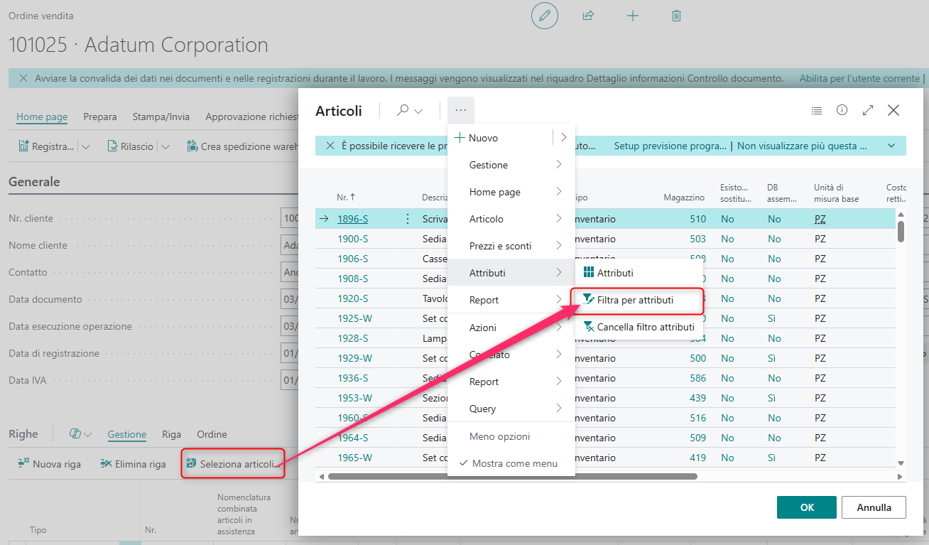
Now, considering that an item's attribute values are stored in a table separate from the item master, we might ask: how exactly do these filters work?
Let's try searching for all items with a width between 50 and 150 and a depth of less than 100.

Once the filters are applied, we find the result comes with a surprise.

The filter we applied has been converted into a filter on the item number. Let's open the filter pane:

In practice, our nice filter on length and depth has turned into an OR filter on item numbers — in this specific case, the filter became:
1900-S|1908-S|1960-S..1964-S|1968-S|1972-S..1988-S|2000-S
At this point, let's ask ourselves: suppose our client has 100,000 items in their master data, each with a full 20-character code, and suppose one day they run a rather “mild” search that returns 90,000 different items.
Applying the OR filter, in the worst case where these items aren't sequential but scattered throughout the list, the resulting filter would contain 90,000 distinct values concatenated with the "|" operator. Are we really sure such an extensive filter works without any problems?
In reality, without going into the details of the AL code behind this complex procedure, the problem is handled and the result is still returned — but depending, let's say, on the number of distinct values contained in the filter, Business Central switches from a pure filtering mode to a temporary-record display mode.
Let's take one final step. If, before applying the attribute filter, I apply a filter on the item number, what happens when I then apply the attribute filter? The answer, if you will, follows from the explanation above: Business Central removes the filter on the item number and replaces it with the one on the attributes.
In our case, in short, we could never ask Business Central to give us items with a width between 50 and 150, a depth of less than 100, and an item number starting with 2.
Conclusions
Item attributes are not a feature to be avoided. In fact, they're extremely useful when it comes to classifying items and making them searchable.
They become a questionable choice, however, when used to represent structural product data — such as dimensions, weights, or technical characteristics — that are an integral part of the item master and may be used frequently in business processes.
In these cases, a few extra fields on the Item table can turn out to be a decidedly simpler, more efficient, and easier-to-maintain choice.
We could sum up by weighing the pros and cons of using them:
Advantages:
There's no need to add a field for every new attribute
Users are free to define new attributes without going through a technical change request
Filtering by attribute values is intuitive
Disadvantages:
Importing values from one system to another isn't simple
Filtering by attribute values can cause slowdowns and has objective limitations
I'll leave the choice of which path to take up to you.
© 2022–2026 Marco Francesco Ferrari. All rights reserved.


Comments